


• Archives
  • Nov1

    And now for a third post in my trifecta of tools for information viewing and copying – the free HTTrack Website Copier allows you to download the entire Internet to your local drive.

    No, not really – but their web site does a nice job of explaining what it does:

    It allows you to download a World Wide Web site from the Internet to a local directory, building recursively all directories, getting HTML, images, and other files from the server to your computer. HTTrack arranges the original site’s relative link-structure.

    Simply open a page of the “mirrored” website in your browser, and you can browse the site from link to link, as if you were viewing it online. HTTrack can also update an existing mirrored site, and resume interrupted downloads. HTTrack is fully configurable, and has an integrated help system.

    Last year I was working my way through reading a fairly large set of local history interviews and photos from the town near where my grandmother was born. These interviews contained interesting stories and I believe more than a few clues to the relationships of various families in the area.

    Then, one day I noticed a new post on the home page of the website: due to lack of local interest, it was to be taken down within several weeks. To avoid losing access to this resource, I broke out my trusty HTTrack, pointed it at the web site in question, set a local directory on my PC to save it in and let it rip. Read More | Comments

  • Oct29

    Family Tree Photo GameSince today is a nice cold rainy day, I’ve set up a game to see how well the kids do putting together the family tree using family photos.
    I think there may be some Oreos ready for some prizes (and for the game leader.)

  • Oct28

    Readability Reader Guy In my previous post I wrote about the open source Greenshot screen capture tool. Here’s another quicker tip and tool to use –

    Have you ever read a site comprised of several columns, with unrelated ads embedded in the center of the article you are trying to read?

    Have you ever wanted to save an article for later, either by converting to PDF or just plain printing it – and all of the text and formatting gets discombobulated in the resulting output?

    Well then, Readability is for you! Their own web site describes it as follows:

    Readability is a web & mobile app that zaps online clutter and saves web articles in a comfortable reading view. No matter where you are or what device you use, your reading will be there.

    I have not used the features that allow things to be sent to alternate devices (like a Kindle), but I do use it regularly in my web browser to simplify articles for archiving.

    Times Example - Original PageTake a sample page from the Irish Times – while not a particularly bad offender in the world of confusing page layouts, there is a lot of “noise” on this page. If you’d like to copy the info in the article, more often than not you and your trusty mouse will be in a fight to the death to select the article headers and content. Read More | Comments

  • Oct28

    PC Cup Holder & Lighter
    As an IT professional there are quite a few tools that I find useful. And I’m not talking about the cigarette lighter cupholder bay at right.

    Anyway, quite handily a few of these tools that I speak of are also useful in doing genealogy and history research.

    This is the first post outlining  a few free or open source tools that are old favorites of mine. And I hope they will soon will be some of yours.*

    Greenshot

    There are many tools that allow you capture screenshots of web pages, programs or anything on your screen. Such captures are useful if you want to save an image in the context on the web page, or perhaps the settings of a site or program do not allow you to copy something you want to keep for reference later. (There are often ways around that, but perhaps that is a follow up post… assuming everyone promises to respect copyright.)

    The simplest way to capture a screen in Windows is to hit the <Print Screen> button, which copies the entire screen to the clipboard. Then you can paste the image into something else like Word or Paint. But, that can get old fast if you have more than a few screenshots to make – and that simple trick also captured the entire screen which is often much more real estate than you want and gives you more cleanup work later.

    So, enter Greenshot, a free and open source tool. From their site:

    Greenshot is a light-weight screenshot software tool for Windows with the following key features:

    • Create complete or partial screenshots quickly.
    • Easily annotate, highlight or obfuscate parts of the screenshot.
    • Send the screenshot to a file, the clipboard, a printer or as e-mail attachment.

    Read More | Comments

  • Oct17

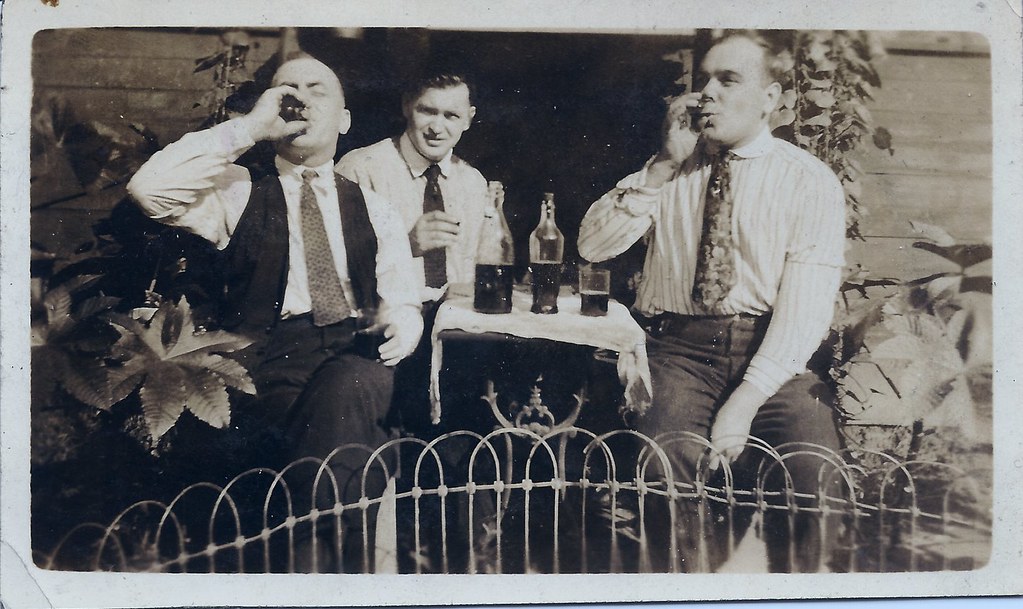
    Not much to describe on these photos – my grandfather John Tierney is the fellow on the left and I would guess this photo is circa 1920 or so. The man in the middle appears in some other photos and I suspect might be the husband of one of my grandfather’s sisters.

    Fire One!

    Fire Two!