• Archives
  • Aug27

    As we wait for Hurricane Irene to arrive, I thought I would take some time to peruse the Library of Congress Chronicling America historical newspaper collection. Unfortunately the site is down for hardware maintenance. Drats.

    But, for those who are in the midst of hurricane obsession, here is a very informative site on the Great Hurricane of 1938 – The Long Island Express.

    Best of luck to all of us awaiting the storm – and soon I hope we will all be singing Good Night Irene.

  • Aug18

    My wife’s great-grandparent’s Petrillo families were used and abused in their 1910 census transcription found on Ancestry. Below is the original image alongside the info in the Ancestry database. Red highlighted ones are incorrectly transcribed.

    Even more odd than such bad gender-bending transcription is the fact that Mary & Katie are both listed as being 7 years old in the database (really 5 & 4 in the image), yet Ancestry has their estimated birth years listed correctly.

    I can see how the reverse “F” for “Female” might throw a transcriber off as a possible “7”, but then how did the birth year get correctly calculated?

    Bad, Bad Enumeration Example from 1910 Census

    Click on image for full size version.

  • Aug16

    Having run into a rather sturdy wall with my Tierneys in New York, I’ve decided to see if I might identify some possible relatives of my great-grandfather Michael Tierney. However, as he arrived around 1880 and we have only just discovered he died in 1913, that’s a tough nut to crack.

    So, for awhile I’ve been thinking of mapping out ALL of the Tierneys in New York over time using New York City Directories.

    To begin the project, I’ve downloaded the Tierney pages of every city directory I could get my hands on – I now have them for the years 1844 to 1934. I’ve then tried using OCR (Optical Character Recognition) software to turn directory images into text that I could massage into correctness.

    1913 NYC Directory Tierney Page Header

    1913 New York City Directory

    Some of these OCR programs worked decidedly better than others. Strangely, the beefy professional software I use at work did the worst job! But, most unfortunately, none of the OCR software did a good enough job to simplify the job of transcribing the names, addresses and professions into a usable format that I wouldn’t have to edit heavily anyway.

    So, I decided to bite the bullet and just transcribe them all by hand into a spreadsheet and go from there. With my *cough* years of computerificness I’m a pretty fast and reasonably accurate typist, and was able to transcribe the 116 Tierneys in the 1913 directory in about an hour and a half (with interruptions.)

    Once I get all of the data transcribed, I’m hoping that by mapping the names, addresses and professions I’ll be able to track not only the individuals over time, but find some patterns and clues for whom might be related to whom.

    For example, I have been trying to find where my great-grandmother Anna Tierney and sons Michael Edward and Thomas F have gone to post-1913. I have not found any of them listed in the 1920 census yet, which has been frustrating. However, by scanning the directories by eye I found an “Anna widow Michael” who appears uptown around 1914. I then noticed there are also men by the names of her sons at the same address. Later on, I find the same three names at a different address along with another Tierney or two.

    I may have found those addresses and the grouping of people sooner with a nice visual – and so may other Tierney searchers later.

    So, as a quick test I’ve taken the data from my 1913 transcription and have had it geocoded and mapped using Batchgeo – take a look below. You can also visit the map directly at this link. I will follow up with more information on techniques I find useful as time goes on.

    View Tierneys from 1913 NYC Directory in a full screen map

    Update: 15 Mar 2012: I’ve started testing out an alternate version using Google Fusion Tables. First run at the 1913 and 1914 data here. (Some bugs found already, and no search controls yet.)

  • Jul26

    All the Way to America: The Story of a Big Italian Family and a Little Shovel

    Anyone who has spent time reading or watching television with young children over the last several years has likely encountered some of Dan Yaccarino’s work – Oswald the Octopus probably being his most well known work.

    Well, for the young and not yet budding genealogist he’s written a very nice book called “All the Way to America: The Story of a Big Italian Family and a Little Shovel.” My wife and kids found it in our library this week, and my 4 year old daughter and I enjoyed reading about the story of his family. Starting with his great-grandfather’s emigration from Italy all the way down to his family today, my daughter had fun following the changes in people and the handoff of the little shovel to each generation. Our 8 year old dove right in on his own and took his time with it as well.

    The story is simply told and his drawing is always soothing – I highly recommend it!
    You can view one of his videos on the book below and see more at the Yaccarino Studio.

  • Jul18

    Update: 11 APR 2016: I have updated this Excel file to fix some formula errors and automate the coloring of the pie charts. See more info in the More Ancestry Pie blog post!

    After seeing a post online recently about creating a pie chart for of one’s ancestry, I thought it might be fun to create a spreadsheet that could calculate someone’s ancestry percentages by country and create a set of pie charts that mimics a standard ancestor chart.

    I’ve created an Excel 2007 spreadsheet that does just that. It may still need some tweaking, but I like the cleaner look of my latest version better than the previous one. (I found that including names above all of the charts made it too congested and hard to read.)

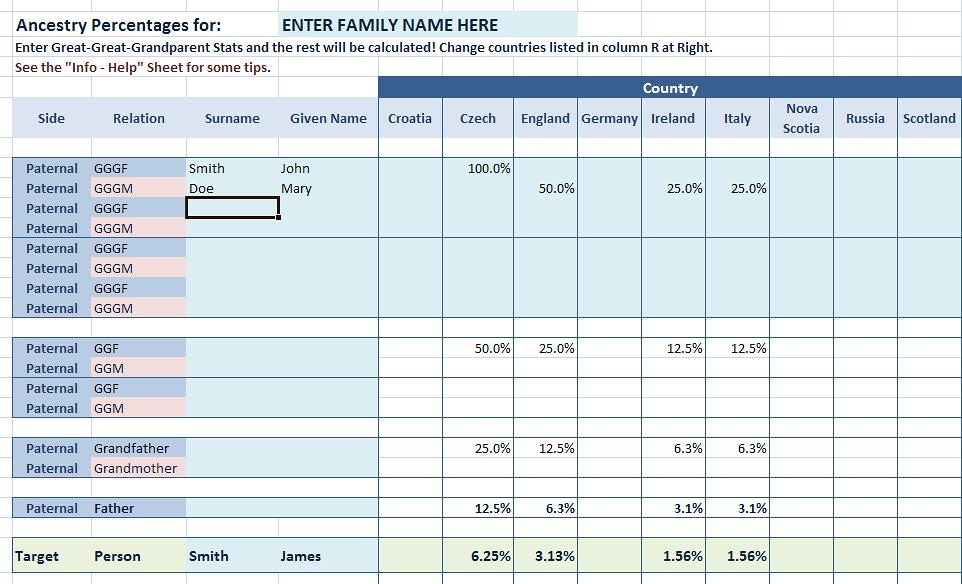
    Ancestry Pie: Excel sheet capture
    All one has to to in this spreadsheet is enter a their family’s names, an applicable list of ancestral countries and then the ancestry percentages for each GG-Grandparent. (An example is at left.)

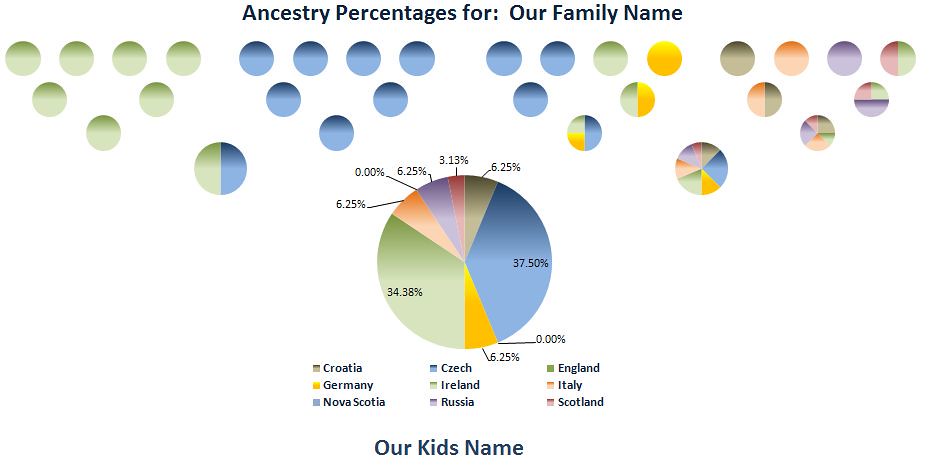
    After entering the GG-Grandparent’s ancestry, everyone else’s is calculated from those and a group of pie charts is created on a separate sheet.

    Ancestry Pie: Charts
    I welcome any ideas and suggestions for improvement – I can’t promise any support, especially if it is used with versions of Excel older than 2007, but I’ll do my best to take a look.

    Also included in the spreadsheet is a separate worksheet with additional notes and some slightly more detailed info on how to enter your data. (If anyone knows how to get Excel NOT to put data labels for 0.00% data without actually deleting the label, please tell me!)

    It can be downloaded from my Downloads page. Be sure to look for the latest info and updates on the post  More Ancestry Pie.

    Note: I updated the Excel spreadsheet on 11 Oct 2011 to with the following:

    • An additional country column for families with up to 10 different ancestral countries
    • Added a 3rd sheet that shows just the pie charts for Parents and Child, all with percentage labels
    • Cleaned up some more formatting