
• Dec7

    On my two hour round trip commute each day, I often take a few mental minutes to go over my research and think about things I might have missed or alternate ways of obtaining information. I also think about birds. and Fudge Town cookies.

    Whatever happened to those? sigh. *Ahem.*

    Well, on Monday it occurred to me that after receiving my great-grandmother Annie McDonald Tierney’s death certificate from the NYC Municipal archives, I had never looked into the possibility that there may be records left from the undertaker who took care of her.

    That thought led me to yet another research coincidence – although it is more of a “Hmm, that’s odd” than “Wahoo! Found more useful info!”

    Last year I had looked up the undertaker on my great-grandfather’s certificate and it looked like the company was still in business. Unfortunately they did not respond to my message via their web site, so I need to trek over there and talk with a live person. (Because at a funeral home, talking to the other people doesn’t help much.)

    Undertaker crop from GGM Annie Tierney's Death CertificateSo, a quick look at GGM Annie’s certificate told me that the undertaker was one Joseph M. Mulligan of 617 East 138th Street. Read More
  • Nov30

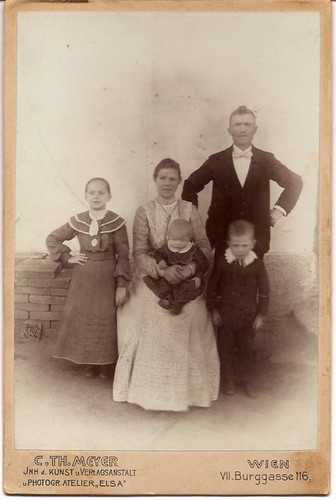
    Cabinet Card, Unknown Family, Wien One of my favorite photos in our family album – but sadly an unknown family. As our family is Czech from the towns of Zámlyní and Předmíř I am very interested to know who from the family might have had their photo taken at Burggasse 116, Wien, Austria.

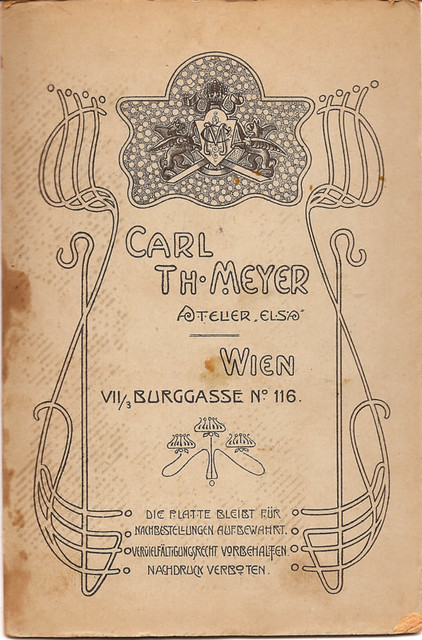
    Cabinet Card, Rear, Unknown Family, WienYou have to love the beautiful design of the rear of this cabinet card…


    For future Google searchers, a transcription of the printed text on both side of the photo are as follows:

    Front of card:
    C. TH. MEYER
    JNH d. KUNST u. Verlagsanstalt
    u. Photogr.Atelier, Else”
    WIEN
    VII.Burggasse 116.

    Rear of card:
    Carl Th. Meyer
    Atelier, Elsa
    Wien
    VII/3 Burgasse No 116

    Die Platte Bleist Fur
    Nachbestellungen AufBewahrt
    Verulelfaltigungsrecht Vorbehalten
    Nachdruck Verboten

  • Nov15

    While watching today’s Ancestry.com webinar and seeing Crista Cowan‘s census table, I noodled around on the Google and created a quick version for download. Just enter names, birth and death years and it will calculate the persons age during each census from 1850 to 1940.

    Act now and it will also gray out cells for censuses in which the person was not around!

    Below is a static version – apparently you can embed Google spreadsheets, but they aren’t editable. Visit this link to use a live version of it.

    Updates:

    December 16, 2014: I tried the cell protection in Google Sheets again after having trouble getting it working in previous years. Looks like it does work now – with lots of opening and closing of the sheet after making every sharing change, named range creation, and range protection change. I also had to sacrifice a chicken. So, only the GREEN cells are now editable in the sheet.

    I found someone had mistakenly overwritten the formula in at least one cell with a number, which I’ve fixed. This new cell protection should avoid that problem in the future.

    November 15, 2016: I’ve added columns to show ages up to the present day even if you start at 1790. I have also added a “Census Year Increment” field. Normally this would remain as a 10, and all the years in the column headers would increment by that amount. But, say you wanted to also have the ages handy for years ending in “5” to help you look for peoples in the NY State censuses: Now you can just change the Increment field to a 5 and Voila! Mathematics is your friend!

    One thing to note: Google Sheets seems to show protected cells by default with a cross-hatch background that makes it hard to read the cell info. You can click on the View menu at the top of the sheet, then de-select the Protected Cells option to get rid of that cross-hatch. (The non-green cells will still be protected, of course.)

    (Don’t worry, I’ve got copies in case the sheet gets borked. And hey you – YES YOU, we all know you don’t have any Walter Melons in you tree so no funny names, Mister Smartypants.)

    You can also download a copy to use in your own Excel or Open Office software by clicking File… Download As… and saving it to your computer.

    Makes a great stocking stuffer!

  • Nov11

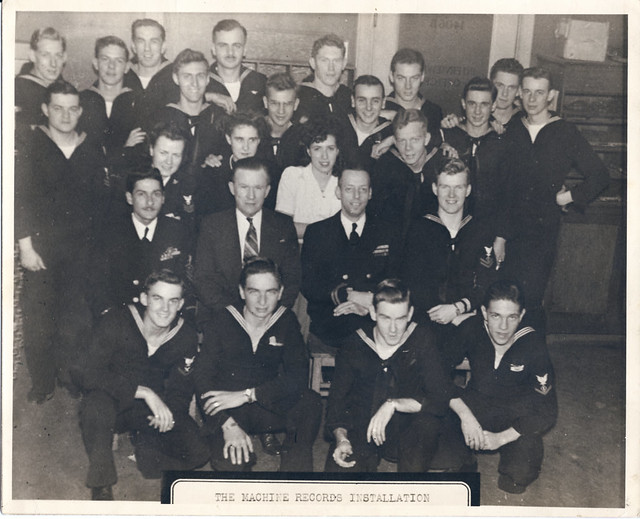
    For Veteran’s Day, I thought I’d post a WWII Navy photo of my Dad with a group of fellows (and a few lucky ladies) from his post in the Personnel Accounting Office’s Machine Records Installation located at 90 Church Street, Manhattan.

    Until recently I thought this photo was taken down in Washington, DC, where he was assigned at the beginning of his service. But recently I found a few alternate copies of this group photo, one of which has the NYC information written on the back.

    Thanks to all who have served our country.

    US Navy, Machine Records Installation, Church Street, NYC, Group Photo

    My father, Michael Tierney is in the rear row, right in front of the door.

  • Nov7

    Ancestry Android App ScreenshotFor those that haven’t heard yet, Ancestry has released an Android app into the Beta-sphere. I’ve played around with it for a few days now, and it is absolutely a nice handy app to have.

    It is still in testing mode and their posting on the Android Market clearly says:

    This is a pre-release product intended for testing only. The ability to add and edit people, search for people in your tree, and more will be available in the final release.

    But, even with some quirks and functionality I think should be added, I am fairly sure that I will be using this app regularly in the future. For posterity, I am recording my first comments back to the Ancestry Beta contact, edited slightly for clarity and to use the screen captures: Read More